---
title: How Microsoft Fabric Variable Libraries Can Save Your CI/CD Pipeline
description: Managing multi-environment deployments in Microsoft Fabric just got dramatically easier
image: https://www.spyglassmtg.com/hubfs/Untitled%20design%20-%202026-02-06T134705.227.png
---
2 min read
# How Microsoft Fabric Variable Libraries Can Save Your CI/CD Pipeline
[ Paula Burke ](https://www.spyglassmtg.com/blog/author/paula-burke) : Updated on February 9, 2026
[Data](https://www.spyglassmtg.com/blog/tag/data)

Modern DevOps workflows increasingly rely on secure, automated authentication between CI/CD pipelines and cloud providers. Microsoft Fabric Variable Libraries offer a powerful way to achieve this without hardcoding credentials and connection strings in your repositories.
### **The CI/CD Pain Point We've All Experienced**
If you've ever deployed a Microsoft Fabric workspace across Dev, Test, and Production environments, you know the drill:
1. Deploy your notebooks and pipelines
2. Manually update every hardcoded connection string
3. Find and replace workspace GUIDs in 47 different places
4. Update lakehouse references across data pipelines
5. Cross your fingers and hope you didn't miss anything
6. Watch as your Production pipeline fails because it's still pointing to Dev SQL Server
7. Scramble to fix it during a critical deployment window
Sound familiar? **There has to be a better way.**
##### **Enter Variable Libraries: The Game Changer**
Microsoft Fabric's Variable Libraries feature is the secret weapon that transforms CI/CD from a manual nightmare into an automated dream. Think of them as environment-aware configuration stores that follow your workspace through every stage of deployment.
**What Are Variable Libraries?**
Variable Libraries in Fabric are workspace-level configuration artifacts that:
- Store key-value pairs (variables) organized by environment
- Automatically switch context based on workspace naming conventions
- Are accessible from both notebooks and data pipelines
- Support multiple value sets (Dev, Test, Prod, Custom)
- Deploy seamlessly through Fabric Git integration or deployment pipelines
**The magic:** Reference a variable once, and it automatically resolves to the correct value based on environment.
##### **Real-World Example: ETL Framework Architecture**
Let me show you how we implemented this in our Fabric ETL framework:
1. **Connections Library - External Source Connections**
**Problem:** We need to connect to different SQL Server instances, Oracle databases, and APIs across environments.
**Traditional Approach:**
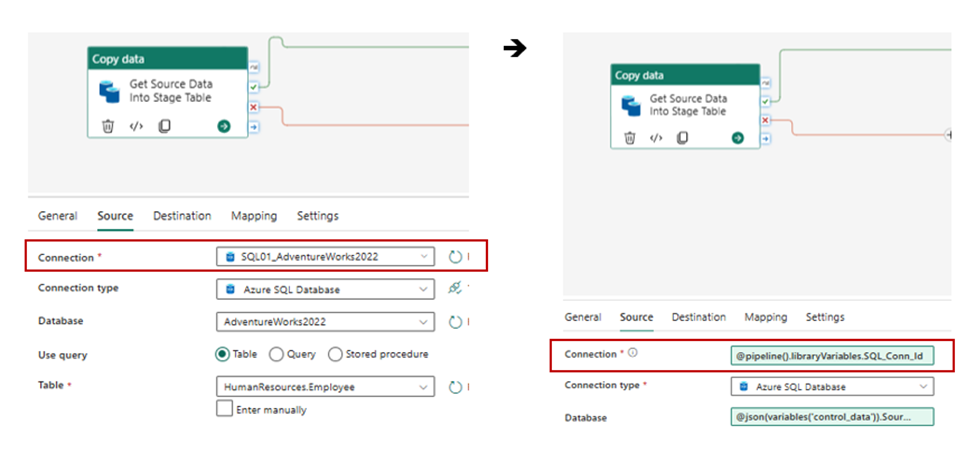
The pipeline example gets data from a SQL source using a Copy Task (red circled item in image).
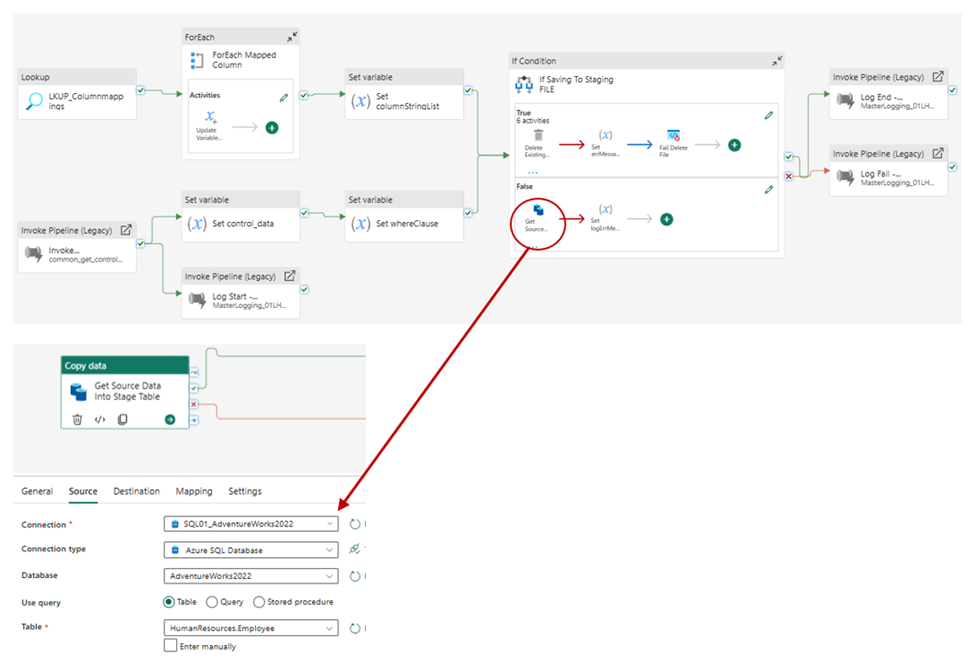The **Connection** to the source would be a fixed value selected from the list of configured connections. In the **DEV** environment this would be using the dev database connection, but would need to be changed to the appropriate server when deployed to the higher environments like **TEST** and **PROD.**
This is a manual effort that would need to be done for all pipelines using a data connection, for each environment, every time it is deployed.
##### **Variable Library Approach**:
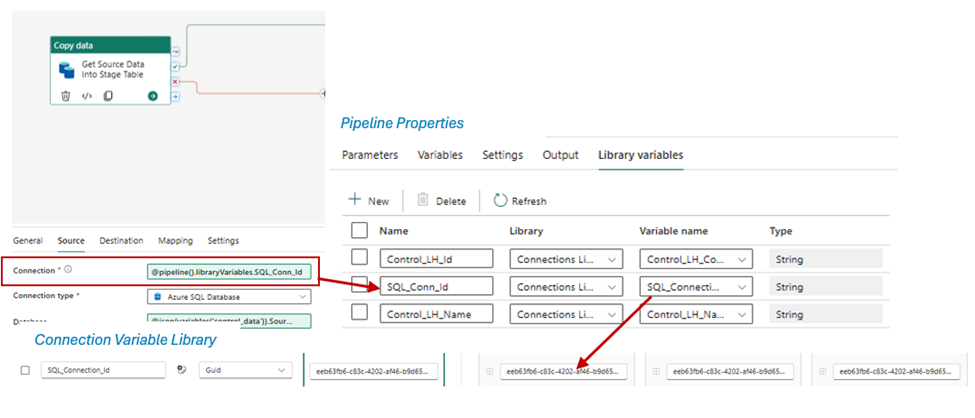
Using Variable Libraries that same pipeline’s Copy Task would look like this:
Now, instead of the hardcoded connection name, the **Connection **is dynamically set to read from the Variable Library
##### **CI/CD Pipeline: Before and After**
**Before Variable Libraries**
**Deployment Steps** (Manual,Error-Prone, 30+ minutes):
**Result**: Deployments are dreaded,infrequent, and high-risk.
**After Variable Libraries**
**Deployment Steps** (Automated,Reliable, 5 minutes):
**Result**: Deployments are routine,frequent, and low-risk.
##### **Setting Up Variable Libraries: Step-by-Step**
**Step 1: Create Variable Librariesin Your Workspace**
*# Navigate to workspace in FabricPortal*
*# Click "New" →"Variable Library"*
*# Name: "ConnectionsLibrary"*
**Step 2: Define Value Sets**
****
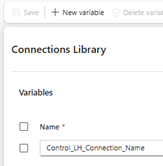
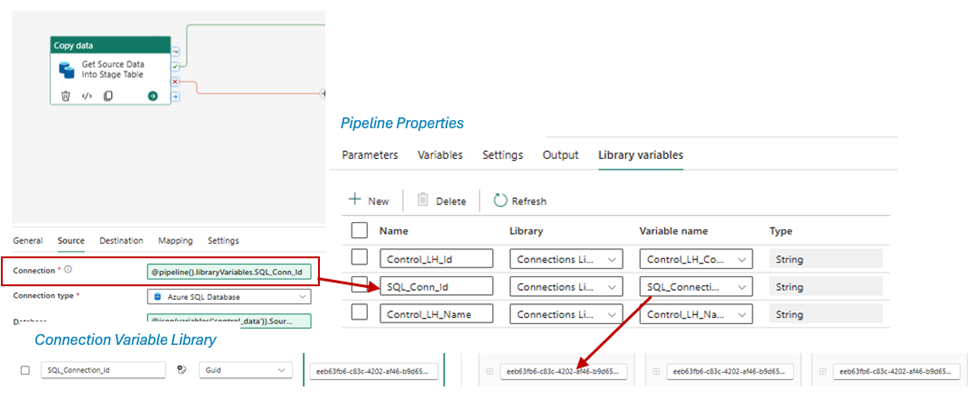
**Step 3: Add the connection entries to the variable library**
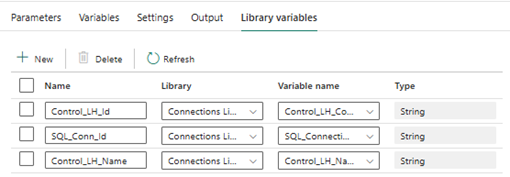
**Step 4: Add the variable library entries to the pipeline’s “Library Variables”**
**Step 5: Update the pipeline replacing the hardcoded connections with the Library Variable **
##### **References:**
**https://learn.microsoft.com/en-us/fabric/cicd/variable-library/get-started-variable-libraries?tabs=home-page**
**https://learn.microsoft.com/en-us/fabric/cicd/variable-library/tutorial-variable-library**
**https://learn.microsoft.com/en-us/fabric/cicd/variable-library/variable-library-overview**
- [Tweet](https://twitter.com/share)
[ ](https://www.spyglassmtg.com/blog/the-skills-behind-copilot-agent-studio-why-its-not-a-technical-job)
1 min read
#### [The Skills Behind Copilot Agent Studio: Why It’s Not a Technical Job](https://www.spyglassmtg.com/blog/the-skills-behind-copilot-agent-studio-why-its-not-a-technical-job)
[Adam Hoffman](https://www.spyglassmtg.com/blog/author/adam-hoffman) : Nov 11, 2025 3:43:17 PM
When people first hear about Copilot Agent Studio, they may assume it requires the same skills as data engineering or traditional software...
[Data](https://www.spyglassmtg.com/blog/tag/data) [Copilot](https://www.spyglassmtg.com/blog/tag/copilot) [Data and AI](https://www.spyglassmtg.com/blog/tag/data-and-ai)
[Read More](https://www.spyglassmtg.com/blog/the-skills-behind-copilot-agent-studio-why-its-not-a-technical-job)
[ ](https://www.spyglassmtg.com/blog/azure-in-the-context-of-data-science)
1 min read
#### [Azure in the Context of Data Science](https://www.spyglassmtg.com/blog/azure-in-the-context-of-data-science)
[David Decker](https://www.spyglassmtg.com/blog/author/david-decker) : Jul 22, 2021 10:30:00 AM
Data Science is an intensely broad field, requiring a vast array of skills and presenting some pervasive patterns of challenges. In this blog, I will...
[Azure](https://www.spyglassmtg.com/blog/tag/azure) [Power BI](https://www.spyglassmtg.com/blog/tag/power-bi) [AI](https://www.spyglassmtg.com/blog/tag/ai) [Data](https://www.spyglassmtg.com/blog/tag/data) [Data Science](https://www.spyglassmtg.com/blog/tag/data-science)
[Read More](https://www.spyglassmtg.com/blog/azure-in-the-context-of-data-science)
[-1.png) ](https://www.spyglassmtg.com/blog/overcoming-sharepoint-bdc-challenges-transitioning-from-dotnetassembly-to-odata-model)
1 min read
#### [Overcoming SharePoint BDC Challenges: Transitioning from DotNetAssembly to OData Model](https://www.spyglassmtg.com/blog/overcoming-sharepoint-bdc-challenges-transitioning-from-dotnetassembly-to-odata-model)
[Gautam Yadav](https://www.spyglassmtg.com/blog/author/gautam-yadav) : Aug 4, 2025 1:14:46 PM
In the ever-evolving world of SharePoint integration, adapting to changes in technology can be a daunting task. Recently, our team faced a...
[Data](https://www.spyglassmtg.com/blog/tag/data) [Data and AI](https://www.spyglassmtg.com/blog/tag/data-and-ai)
[Read More](https://www.spyglassmtg.com/blog/overcoming-sharepoint-bdc-challenges-transitioning-from-dotnetassembly-to-odata-model)