2 min read
.png)
Turning Databricks Cost Data into Intelligence with Genie
By Vishvesh Kaushik
Cloud spending is easy to accumulate and harder to explain. A dashboard can show that costs increased, but the next question often requires a specialist: which workload changed, who owns it, and what should we investigate?
We recently built a Databricks Genie agent for a Fortune 500 organization to make those questions easier to answer in natural language. The same curated data also powered a BI dashboard and alerting on anomalies. The architectural lesson is here broadly useful: build a reliable cost foundation once, then give teams several ways to use it.
Make cost data understandable first
Our starting point was Databricks system-table data covering billing usage, pricing, compute, jobs, queries, and audit activity. These records provide valuable evidence, but they need context before they can answer business questions.
A scheduled Databricks job runs a sequence of notebooks through Bronze, Silver, and Gold layers. Bronze captures the source records. Silver normalizes usage and brings together resource metadata, identity mappings, tags, and workspace and environment mappings.
Gold turns those records into cost attribution by workspace, environment, resource type, resource name, workload, user, and owner. Curated Delta tables registered in Unity Catalog provide a common foundation for reporting and conversational analysis.
This step matters because a technically correct total can still be difficult to act on. A cost associated with a recognizable workload and owner gives the platform team a starting point for investigation. Missing attribution should remain visible rather than disappearing into a misleading category.
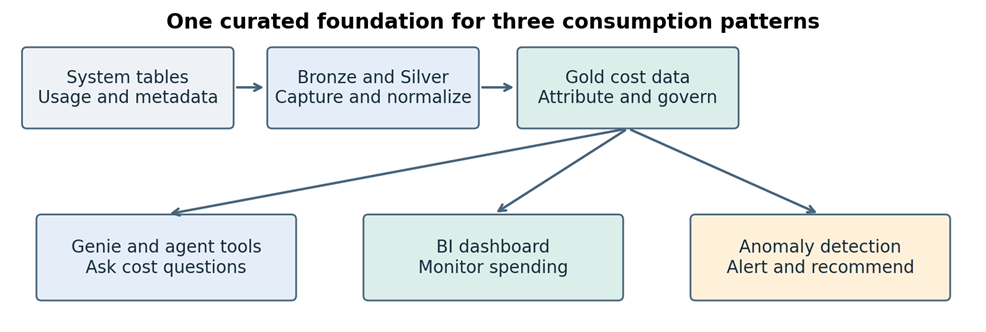
Simplified architecture based on the implementation. Recommendation outputs also feed the agent experience.
One foundation for three experiences
The solution combines Genie with custom agent tools for cost summaries, workspace trends, resource details, ownership lookups, and anomaly queries. Those tools give conversational experience access to the context needed for an investigation.
We can add sources in Databricks Genie and Databricks enables conversational interface with data automatically.
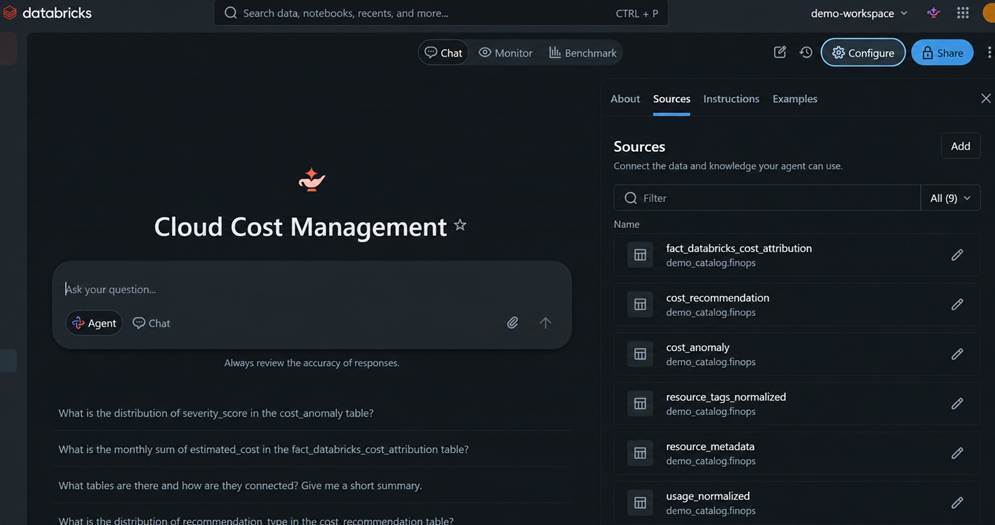
Users can ask follow-up questions without first learning the billing schema or requesting another dashboard page. Illustrative questions include:
- Which workspaces had the highest cost last month?
- Which resources increased most compared with the previous week?
- Who owns the workload associated with this increase?
In our experience some fine tuning is required. Initially we were getting answers that included technical names of the workspaces, we had to add some mapping data so that we could get answers in business-friendly language.
Second experience the BI dashboard provides a consistent view of overall spending, workspace and resource trends, and weekly anomalies. It is useful for recurring reviews where finance and platform teams want to monitor familiar measures over time.
The third experience is proactive monitoring. Anomaly detection identifies cost spikes, non-production weekend usage, and increases in unattributed spending. Alerting brings these conditions to attention without waiting for someone to open the dashboard or ask a question.
Turn an alert into an investigation
Consider an illustrative weekend increase in a development workspace. The anomaly process flags the spending pattern. An engineer then uses Genie to examine which resources contributed to the increase and look up the associated ownership information. The dashboard provides the broader trend for the next review.
These are complementary interactions with the same cost model. An alert identifies something worth examining; the conversation helps narrow the investigation; the dashboard keeps the longer-term pattern visible.